
How do I install this?
Set up your Infoseek account to get your app URL, then paste that URL into your preferred AI client.
Launch ticket discovery, event search, and ticket-browsing experiences inside your AI product without building and maintaining your own ticketing integration stack.
custom_attachments for event and ticket carousels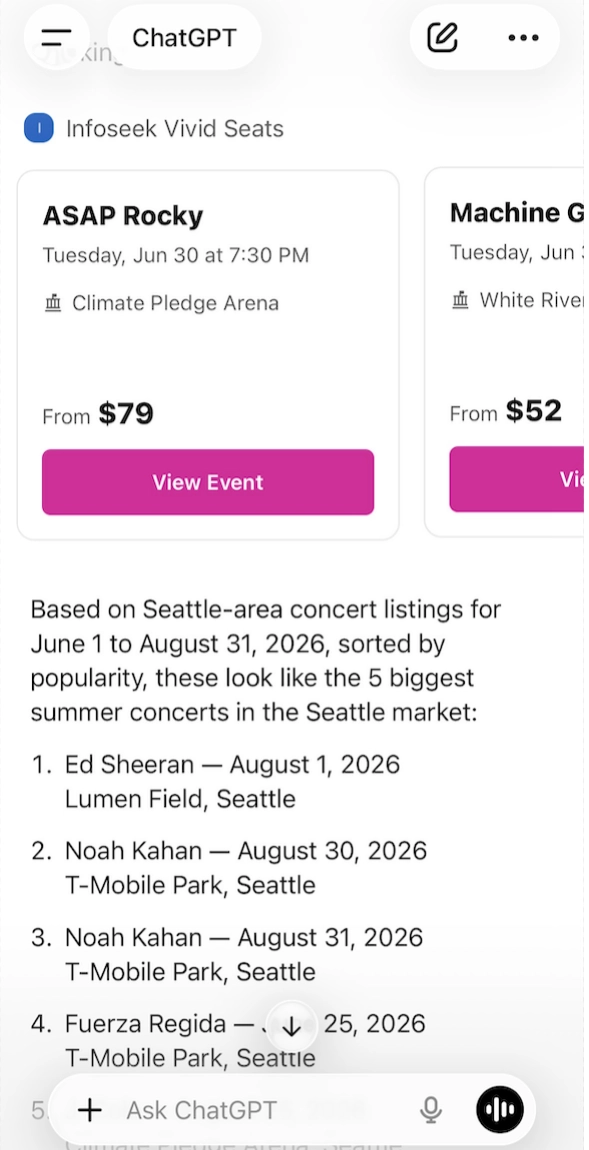
Common questions teams ask before integrating Vivid Seats MCP.
Set up your Infoseek account to get your app URL, then paste that URL into your preferred AI client.
It supports event search and ticket listing workflows with structured, widget-ready output for AI apps and agents.
Queries run live at request time. Inventory and prices can change quickly, so rerun before checkout.
SearchEvents needs a search query or resolved IDs. BrowseTicketsForEvent requires an eventId.
Yes. You can filter using geography, date ranges, category fields, and ticket constraints like quantity and max price.
Yes. Run Vivid Seats MCP in scheduled Codex workflows and send snapshots or alerts via your email step.
Most requests complete in seconds, depending on event scope, filters, and provider response times.
Yes. Any MCP client that supports tools/list and tools/call can integrate this endpoint.
The public surface is designed for real AI shopping and discovery workflows: one event-search tool, one ticket-browsing tool, and the lookup helpers needed to keep results precise and production-ready.
Core tool
Search for live events and return an event carousel with images, dates, venues, pricing bands, and IDs you can pass into BrowseTicketsForEvent.
Common inputs
queryperformerId, venueIddateStart, dateEndUseful filters
lat, lng, radiuscategoryId, subCategoryIdsortBy, excludeParkingReturns
structuredContent.context[]structuredContent.custom_attachments[]_meta.openai/outputTemplateCore tool
Fetch ticket listings for one event. This is the ticket-detail surface: it returns listing IDs, sections, rows, prices, delivery methods, seat views, section/group summaries, and checkout links.
Required input
eventIdUseful filters
quantityNeededsectionminPrice, maxPricedeliveryMethodReturns
availableSections[]availableGroups[]listings[]custom_attachments[]Lookup helpers
These helper tools make the main event and ticket calls more precise by resolving user text into stable IDs or coordinates.
LookupSearchSuggestions resolves performer, team, venue, or event names.
LookupLocation resolves a location string into lat, lng, and radius.
LookupCategory returns category and subcategory IDs.
LookupEvent returns event IDs without rendering the event carousel.
SearchPoliciesReference searches policy/reference content when the policy docs need a direct lookup.
The Vivid Seats MCP is built for agent experiences that need to show real inventory, not just summarize it. The important fields are the human context lines, the custom_attachments array that drives the carousel, and the promoted openai/outputTemplate metadata.
custom_attachments[]
Primary UI payload. Event searches render event carousels and ticket browsing renders ticket cards with actions and checkout links.
context[]
Compact assistant-ready guidance about what is on screen and what filters can be applied next.
_meta
Includes openai/outputTemplate so chat clients can mount the ticket widget automatically.
Embedded listing data
The text payload also embeds sections, prices, delivery methods, and checkout URLs, which is useful for fallback reasoning.
{
  "structuredContent": {
    "context": [
      "Your golden tickets await..."
    ],
    "custom_attachments": [
      {
        "type": "custom",
        "data": "{\"eventInfo\": {...}, \"tickets\": [...]}"
      }
    ]
  },
  "_meta": {
    "openai/outputTemplate": "ui://widget/sierra-attachment.html"
  }
}For best results, resolve names first, search events second, and browse tickets third. That gives your product a cleaner sales funnel: better search precision up front, then richer ticket cards when the user is ready to buy.
LookupSearchSuggestions when the user names a performer, team, venue, or event.LookupLocation when the user provides a city, ZIP code, or coordinates.SearchEvents with those resolved IDs or coordinates.BrowseTicketsForEvent with the chosen eventId and any ticket filters.{
"jsonrpc": "2.0",
"id": "tickets-1",
"method": "tools/call",
"params": {
"name": "BrowseTicketsForEvent",
"arguments": {
"eventId": 6641236,
"quantityNeeded": 2,
"section": "Section 6",
"maxPrice": 60
}
}
}Access
This MCP is available through Infoseek. Reach out to get access enabled for your app or agent workflow.
Integration
We’ll help you wire the MCP into your chat product, agent workflow, or discovery UI once access is enabled.
Event discovery agents
Turn vague entertainment intent into clickable event options and keep the user inside your product instead of sending them to search results pages.
Ticket comparison UX
Render carousels immediately from custom_attachments without building your own card layer, ticket parser, or event-to-listing handoff.
Structured checkout handoff
Preserve listing IDs, ticket metadata, and checkout URLs so your assistant can move from discovery to a purchase-ready handoff with less custom engineering.