How do I install this?
Set up your Infoseek account to get your app URL, then paste that URL into your preferred AI client.
 Marketing Analytics MCP
Give your AI apps direct GA4 reporting power with weekly KPI trends and channel-level traffic insights in structured JSON.
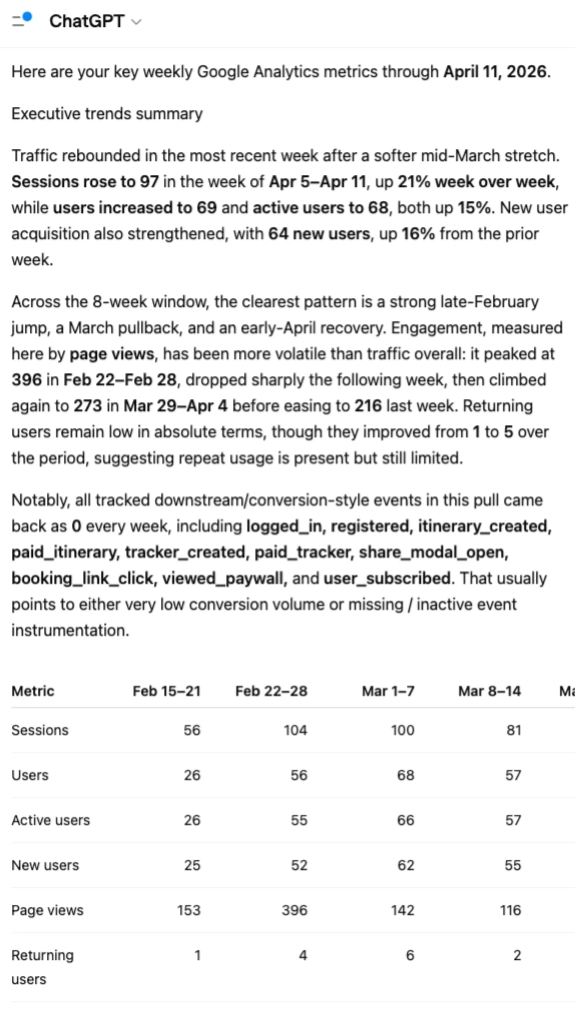
Run scheduled analytics workflows with Codex to fetch weekly GA4 trends, summarize insights, and route updates to your team.
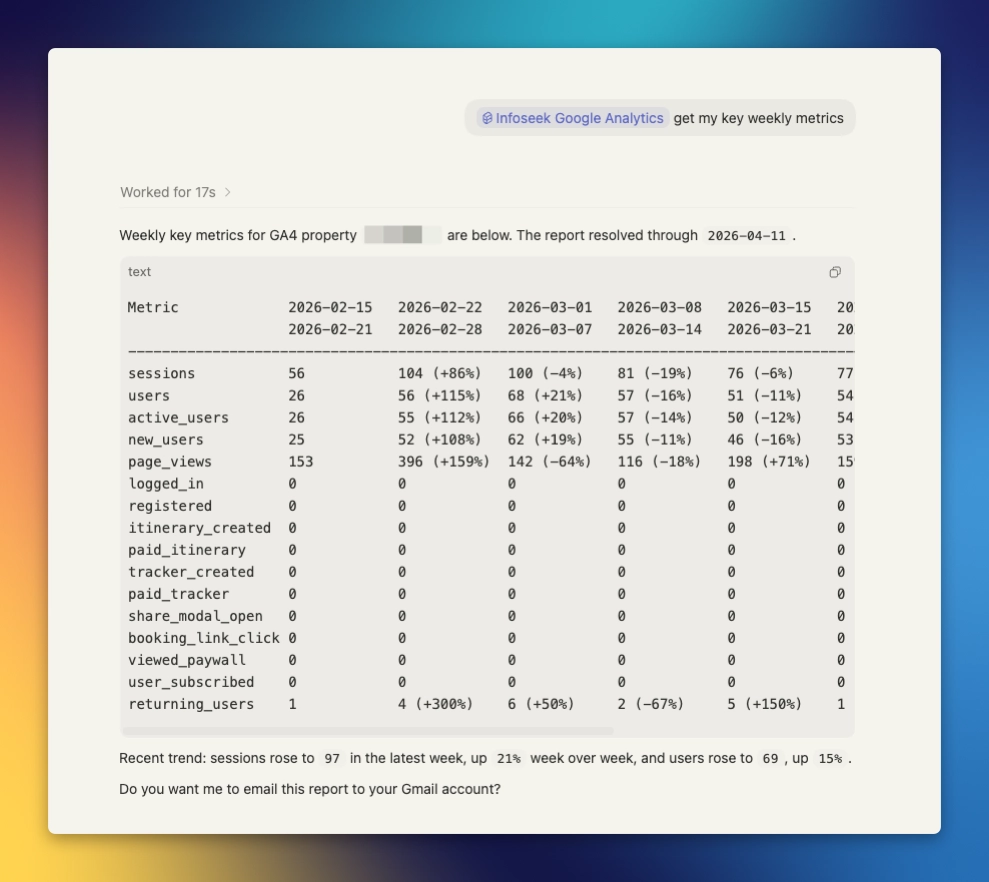
Common questions teams ask before integrating Google Analytics MCP.
Set up your Infoseek account to get your app URL, then paste that URL into your preferred AI client.
It provides GA4 weekly metrics and source/medium session reporting in structured output designed for AI agents and dashboards.
Both analytics tools require property_ids, passed as one or more GA4 property IDs. end_date is optional.
Yes. Pass multiple values in property_ids to aggregate across properties in the same call.
The service defaults to yesterday, then anchors reporting to the latest Saturday on or before that date to produce clean weekly windows.
Yes. The MCP returns machine-friendly arrays and labels, so Codex agents can rank channels, summarize trends, and trigger follow-up actions.
Most requests complete in seconds, depending on Google API response time and the number of properties queried.
Yes. Any MCP client that supports tools/list and tools/call can integrate this endpoint.
Google Analytics MCP exposes two high-value reporting calls that are enough to power recurring executive updates and channel diagnostics.
Tool
Fetches 8 weeks of GA4 KPI trends, including weekly values and week-over-week percent change arrays for each metric.
Required input
property_ids[]Useful optional input
end_date (YYYY-MM-DD)Output highlights
weeks[]metrics[].weekly_valuesmetrics[].weekly_pct_change_vs_prevTool
Returns 8-week source/medium session breakdowns, plus totals arrays that make attribution and trend analysis straightforward in agents and UIs.
Required input
property_ids[]Useful optional input
end_date (YYYY-MM-DD)Output highlights
rows[].source_mediumrows[].weekly_sessionstotals.total_sessionsThe response is built for immediate downstream use: explicit week windows, metric arrays, and source labels you can rank, chart, and summarize without extra normalization.
weeks[]
Standardized weekly date windows for charting and narrative comparison.
metrics[] / rows[]
Ready arrays for KPI dashboards and attribution drill-downs.
totals
Fast aggregate context for confidence checks and executive summaries.
{
  "property_ids": [""],
  "requested_end_date": "2026-04-12",
  "resolved_end_date": "2026-04-11",
  "weeks": [
    { "start_date": "2026-02-16", "end_date": "2026-02-22" },
    { "start_date": "2026-02-23", "end_date": "2026-03-01" }
  ],
  "metrics": [
    {
      "metric": "sessions",
      "weekly_values": [1154, 1249, 1330, 1291, 1410, 1504, 1620, 1713],
      "weekly_pct_change_vs_prev": [null, 8, 6, -3, 9, 7, 8, 6]
    },
    {
      "metric": "returning_users",
      "weekly_values": [402, 430, 451, 446, 480, 511, 545, 571],
      "weekly_pct_change_vs_prev": [null, 7, 5, -1, 7, 6, 6, 4]
    }
  ],
  "rows": [
    {
      "source_medium": "google / organic",
      "weekly_sessions": [410, 442, 470, 463, 511, 544, 580, 603],
      "total_sessions": 4023,
      "latest_week_sessions": 603
    }
  ],
  "totals": {
    "weekly_sessions": [1154, 1249, 1330, 1291, 1410, 1504, 1620, 1713],
    "total_sessions": 11271
  }
}
Most teams call both tools together: one for weekly KPI trendlines and one for channel attribution detail.
google_analytics_fetch_key_metrics_weekly with your GA4 property ID placeholder set.google_analytics_fetch_sessions_by_source_weekly for attribution context.const metrics = await mcp.callTool("google_analytics_fetch_key_metrics_weekly", {
property_ids: [""]
});
const channels = await mcp.callTool("google_analytics_fetch_sessions_by_source_weekly", {
property_ids: [""]
});
return {
weekEnding: metrics.resolved_end_date,
sessionsTrend: metrics.metrics.find(m => m.metric === "sessions"),
topSources: channels.rows.slice(0, 5)
};
The Infoseek MCP route is the supported integration surface.
Use OAuth to connect your Google account securely. Tool calls run with the authenticated account context and property access scope.
For server-to-server integrations, request a developer token path with Infoseek to standardize auth across your agents and pipelines.
Aligned week ranges prevent dashboard drift and simplify consistent executive reporting over time.
Use source/medium rows and totals directly in your agent logic without building custom channel rollups first.
Percent-change arrays and latest-week values give LLMs the exact structure needed for reliable trend narration.
Common ways teams deploy Google Analytics MCP in production.
Auto-generate executive snapshots that explain week-over-week KPI shifts and channel movement.
Detect and surface organic, paid, or referral swings fast, then trigger follow-up analysis workflows.
Run daily or weekly Codex agents that call GA tools and distribute summaries to Slack, email, or internal dashboards.