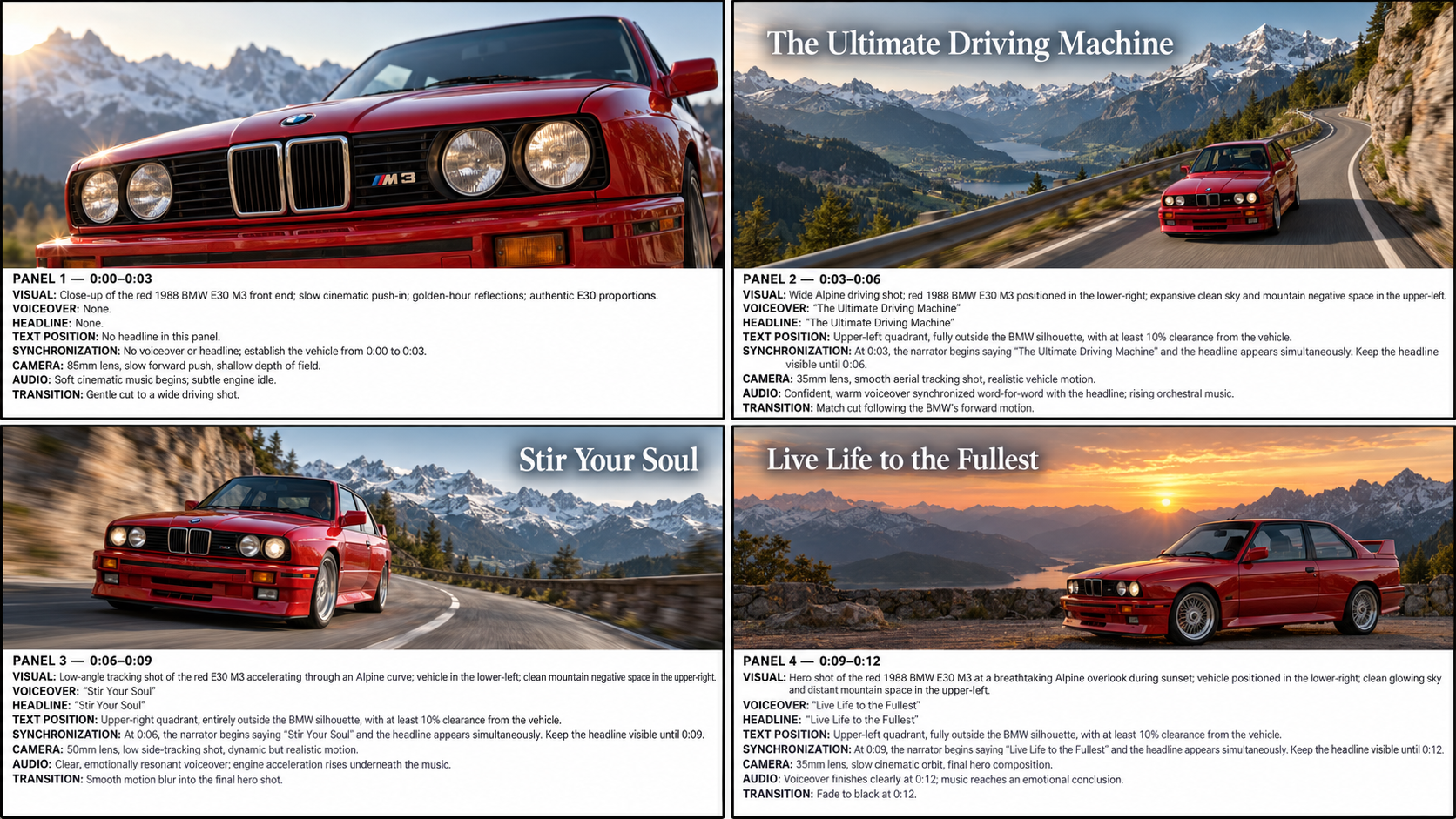
Ask ChatGPT to generate one high-resolution, landscape 16:9 storyboard image for your desired video. Describe the subject, shot timing, visual direction, voiceover, headline, text position, synchronization, camera, audio, and transition for every panel.
Show the complete BMW M3 example prompt
Generate one high-resolution, landscape 16:9 storyboard image for a premium product promotional video. Use real-world photographic imagery in every panel. Do not use illustrations, sketches, cartoons, CGI mockups, concept art, wireframes, or placeholder imagery.

Create exactly four storyboard panels in a clean 2-by-2 layout. Each panel must contain:

1. A large photorealistic live-action image at the top.
2. A clearly separated professional production-information section directly below the image.
3. All settings written explicitly below the image, including visual direction, voiceover, headline, text position, synchronization, camera, audio, and transition.

The storyboard sheet itself must be landscape 16:9. The production information below each image must be large enough to read clearly. Do not place the production notes over the photographic imagery.

Project:

* Product: A red 1988 BMW M3, specifically the classic E30 M3
* Concept: A cinematic drive through the Swiss Alps
* Video format: 16:9 widescreen
* Total duration: 12 seconds
* Number of panels: 4
* Duration per panel: Exactly 3 seconds
* Style: Photorealistic live-action automotive commercial using real Alpine roads, authentic mountain landscapes, natural lighting, accurate vehicle proportions, realistic reflections, and believable driving motion
* Mood: Emotional, aspirational, elegant, powerful, and adventurous

Panel timing and content:

PANEL 1 — 0:00–0:03

Photographic image: A realistic close-up of the red 1988 BMW E30 M3’s rectangular headlights, front grille, hood, and glossy red paint. Position the car in the lower half of the image and leave clean Alpine sky or mountain space above it.

Below the image, display these exact production notes:

VISUAL: Close-up of the red 1988 BMW E30 M3 front end; slow cinematic push-in; golden-hour reflections; authentic E30 proportions.
VOICEOVER: None.
HEADLINE: None.
TEXT POSITION: No headline in this panel.
SYNCHRONIZATION: No voiceover or headline; establish the vehicle from 0:00 to 0:03.
CAMERA: 85mm lens, slow forward push, shallow depth of field.
AUDIO: Soft cinematic music begins; subtle engine idle.
TRANSITION: Gentle cut to a wide driving shot.

PANEL 2 — 0:03–0:06

Photographic image: A realistic wide shot of the red BMW driving along a winding Alpine mountain road with snow-capped peaks, green valleys, guardrails, and natural atmospheric depth. Position the BMW in the lower-right portion of the image. Reserve the upper-left quadrant as clean negative space.

Place the headline only in the upper-left quadrant, entirely over the open sky or distant mountain background. The headline must not overlap or touch the BMW.

Below the image, display these exact production notes:

VISUAL: Wide Alpine driving shot; red 1988 BMW E30 M3 positioned in the lower-right; expansive clean sky and mountain negative space in the upper-left.
VOICEOVER: “The Ultimate Driving Machine”
HEADLINE: “The Ultimate Driving Machine”
TEXT POSITION: Upper-left quadrant, fully outside the BMW silhouette, with at least 10% clearance from the vehicle.
SYNCHRONIZATION: At 0:03, the narrator begins saying “The Ultimate Driving Machine” and the headline appears simultaneously. Keep the headline visible until 0:06.
CAMERA: 35mm lens, smooth aerial tracking shot, realistic vehicle motion.
AUDIO: Confident, warm voiceover synchronized word-for-word with the headline; rising orchestral music.
TRANSITION: Match cut following the BMW’s forward motion.

PANEL 3 — 0:06–0:09

Photographic image: A realistic low-angle tracking shot of the BMW accelerating through a dramatic mountain curve. Position the BMW in the lower-left portion of the image. Reserve the upper-right quadrant as clean mountain or sky space.

Place the headline only in the upper-right quadrant, completely separate from the BMW and road details. Never place the text over the hood, roof, windshield, wheels, doors, or body panels.

Below the image, display these exact production notes:

VISUAL: Low-angle tracking shot of the red E30 M3 accelerating through an Alpine curve; vehicle in the lower-left; clean mountain negative space in the upper-right.
VOICEOVER: “Stir Your Soul”
HEADLINE: “Stir Your Soul”
TEXT POSITION: Upper-right quadrant, entirely outside the BMW silhouette, with at least 10% clearance from the vehicle.
SYNCHRONIZATION: At 0:06, the narrator begins saying “Stir Your Soul” and the headline appears simultaneously. Keep the headline visible until 0:09.
CAMERA: 50mm lens, low side-tracking shot, dynamic but realistic motion.
AUDIO: Clear, emotionally resonant voiceover; engine acceleration rises underneath the music.
TRANSITION: Smooth motion blur into the final hero shot.

PANEL 4 — 0:09–0:12

Photographic image: A realistic hero shot of the BMW arriving at an Alpine overlook during golden-hour sunset. Position the vehicle in the lower-center or lower-right portion of the image. Reserve the upper-left quadrant as clean open sky or distant mountain space.

Place the headline only in the upper-left quadrant, with generous separation from the vehicle. Never place the text on the car.

Below the image, display these exact production notes:

VISUAL: Hero shot of the red 1988 BMW E30 M3 at a breathtaking Alpine overlook during sunset; vehicle positioned in the lower-right; clean glowing sky in the upper-left.
VOICEOVER: “Live Life to the Fullest”
HEADLINE: “Live Life to the Fullest”
TEXT POSITION: Upper-left quadrant, fully outside the BMW silhouette, with at least 10% clearance from the vehicle.
SYNCHRONIZATION: At 0:09, the narrator begins saying “Live Life to the Fullest” and the headline appears simultaneously. Keep the headline visible until 0:12.
CAMERA: 35mm lens, slow cinematic orbit, final hero composition.
AUDIO: Voiceover finishes clearly at 0:12; music reaches an emotional conclusion.
TRANSITION: Fade to black at 0:12.

Critical product-and-text composition rules:

* Never place headline text on top of the product.
* Text must never overlap, touch, obscure, or sit across any part of the BMW.
* Keep every headline outside the complete product silhouette.
* Maintain at least 10% visual clearance between text and the vehicle.
* Deliberately reposition the car or change the camera angle whenever necessary to create negative space.
* Do not place text over busy scenery, road markings, guardrails, or important vehicle details.
* The photographic image must visibly demonstrate the intended text-safe area.
* The production notes must appear below each image, never over the image.

Text and voice accuracy rules:

* Use professional Title Case exactly as follows:
  1. “The Ultimate Driving Machine”
  2. “Stir Your Soul”
  3. “Live Life to the Fullest”
* Preserve every letter, space, and word order.
* The spoken voiceover must match the corresponding headline exactly.
* Do not add any unapproved narration.
* Text must be sharp, stable, correctly spelled, and perfectly legible.
* Do not create warped letters, missing letters, duplicated letters, random symbols, flickering, or changing typography.
* Use elegant white typography with subtle shadow or a transparent dark backing.
* Do not include unintended text, road signs, license-plate lettering, watermarks, fake logos, or random symbols anywhere in the photographic imagery.

Final storyboard-image requirements:

* Exactly four panels.
* Exactly three seconds per panel.
* Landscape 16:9 format.
* Real-world photographic imagery in every panel.
* Large image on top and explicit production settings directly below each image.
* Every panel must explicitly show VISUAL, VOICEOVER, HEADLINE, TEXT POSITION, SYNCHRONIZATION, CAMERA, AUDIO, and TRANSITION.
* Generate only the finished storyboard image, not a written explanation.