
How do I install this?
Set up your Infoseek account to get your app URL, then paste that URL into your preferred AI client.
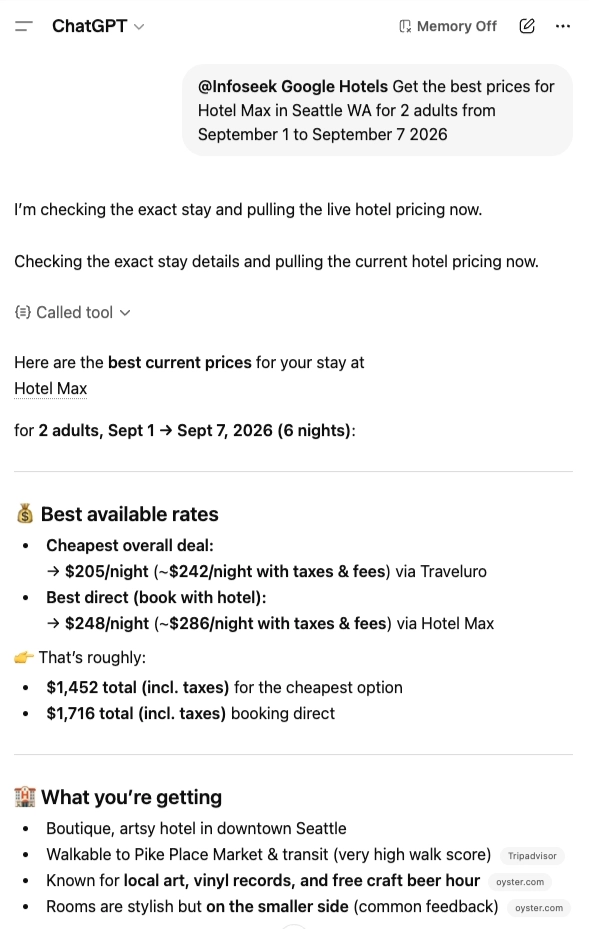
Use Google Hotels prices for your hotel on your dates directly in ChatGPT, Claude, Gemini, and other AI workflows.
Common questions teams ask before integrating Google Hotels Prices MCP.
Set up your Infoseek account to get your app URL, then paste that URL into your preferred AI client.
It returns exact-stay Google Hotels pricing for a specific hotel and date range, including best overall and best direct-booking results.
Searches are live at request time. Hotel prices and availability can change quickly, so rerun before booking.
Required fields are hotel_name, hotel_city, hotel_check_in_date_yyyy_mm_dd, and hotel_check_out_date_yyyy_mm_dd.
Yes. You can add optional fields like hotel_guest_count, street, state, and country to improve matching precision.
Yes. Run this MCP in a scheduled Codex Agent or workflow and send the latest results through your email step.
Most requests complete in seconds, depending on hotel resolution and provider response time.
Yes. Any MCP client that supports tools/list and tools/call can integrate this endpoint.
One shot tool takes the hotel identity and stay dates, then returns the pricing payload your app actually needs.
Tool
Use this one-shot tool when you know the hotel and the stay dates. It returns the price payload your agent can reason over immediately.
Required inputs
hotel_namehotel_cityhotel_check_in_date_yyyy_mm_ddhotel_check_out_date_yyyy_mm_ddUseful optional inputs
hotel_guest_counthotel_streethotel_state, hotel_countryReturns
results.best_overall_priceresults.best_direct_priceresults.final_google_search_urlmeta.seller_countThe value is not just raw seller rows. The MCP surfaces the prices and link fields most useful for ranking, agent reasoning, and immediate UI rendering.
best_overall_price
Fastest way to rank the cheapest seller for the exact stay.
best_direct_price
Lets your app prefer direct-booking options without reprocessing every seller row.
final_google_search_url
Canonical search URL you can store, re-run, or link out to later.
seller_count + sellers[]
Useful for UI confidence, merchant comparisons, and fallback ranking logic.
{
  "results": {
    "best_overall_price": {
      "seller": "Hotels.com",
      "price": 312.00,
      "currency": "USD",
      "price_with_tax_fees": 357.18
    },
    "best_direct_price": {
      "seller": "Hotel website",
      "price": 329.00,
      "currency": "USD",
      "price_with_tax_fees": 374.11
    },
    "final_google_search_url": "https://www.google.com/travel/hotels/entity/...",
    "sellers": [
      {
        "seller": "Hotels.com",
        "price": 312.00,
        "currency": "USD",
        "is_direct_booking": false
      },
      {
        "seller": "Hotel website",
        "price": 329.00,
        "currency": "USD",
        "is_direct_booking": true
      }
    ]
  },
  "meta": {
    "handle": "Google Hotels",
    "display_name": "Google Hotels Search",
    "status": "ok",
    "seller_count": 2
  }
}
Most integrations are a single MCP call: provide the hotel identity and stay dates, then consume the returned pricing payload.
const pricing = await mcp.callTool("get_hotel_prices", {
  hotel_name: "Ace Hotel New York",
  hotel_city: "New York",
  hotel_check_in_date_yyyy_mm_dd: "2026-05-01",
  hotel_check_out_date_yyyy_mm_dd: "2026-05-04",
  hotel_guest_count: "2"
});

return {
  overall: pricing.results.best_overall_price,
  direct: pricing.results.best_direct_price,
  url: pricing.results.final_google_search_url
};
Choose the auth model that fits your integration. OAuth is available, but not required if you prefer a developer token in the header.
Use Infoseek auth when you want a user-session flow or managed access from an interactive app experience.
Use a developer token in the request header when you want simple service-to-service access without a user login flow.
Let your agent compare cheapest overall pricing against direct-booking options without extra parsing or post-processing.
Keep a stable Google Hotels URL you can re-run, store with itineraries, or hand off to the frontend for user review.
Use seller rows and counts to support ranking, merchant explanations, and confidence checks in your app logic.
Answer “What is the best price for this hotel on my dates?” with normalized seller results your agent can compare instantly.
Blend live hotel pricing into broader itinerary planning, budget workflows, and trip recommendation experiences.
Support procurement, concierge, or travel-desk tooling that needs a clean hotel pricing payload without building the scrape layer yourself.