
How do I install this?
Set up your Infoseek account to get your app URL, then paste that URL into your preferred AI client.
Connect Tesla account, vehicle, and remote-command workflows to ChatGPT, Claude, Gemini, and internal copilots with a single OAuth-protected MCP.
Common questions teams ask before integrating Tesla MCP.
Set up your Infoseek account to get your app URL, then paste that URL into your preferred AI client.
It connects to your Tesla account for vehicle status, climate, locks, windows, navigation, and locate/boombox actions through one MCP surface.
Yes. Tesla MCP actions are account-scoped and require OAuth authorization before read/write vehicle operations.
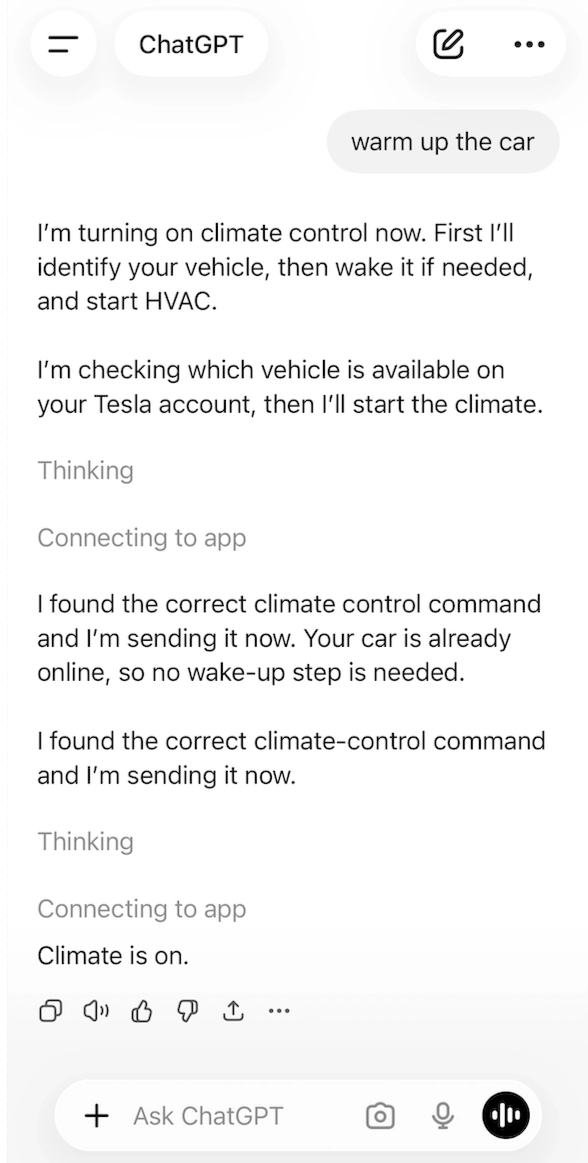
Call vehicle_wake_up first, then vehicle_auto_conditioning_start for the selected vehicle ID.
Yes. Use GPS coordinates, Google Place IDs, or waypoint routes via the navigation tools.
Yes. Run Tesla MCP calls in scheduled Codex Agents or workflows and send summaries through your preferred notification step.
Most reads complete in seconds; wake-up actions can take longer when the vehicle is asleep.
Yes. Any MCP client supporting tools/list and tools/call can integrate this endpoint.
Tezla exposes a broad but clean Tesla control surface. Every public tool is OAuth-protected and uses real Tesla vehicle identifiers from vehicle_list.
vehicle_list returns the available Tesla vehicles. vehicle_status_overview returns battery, range, charging, location, locks, windows, doors, firmware, and alerts.
vehicle_door_lock, vehicle_door_unlock, vehicle_flash_lights, and vehicle_honk_horn support common parked-car and access actions.
vehicle_wake_up is a prerequisite tool. vehicle_auto_conditioning_start and vehicle_auto_conditioning_stop are the final climate actions.
vehicle_window_control supports vent and close. vehicle_sun_roof_control supports sunroof vent and close where Tesla hardware allows it.
vehicle_navigation_gps_request, vehicle_navigation_placeid_request, and vehicle_navigation_waypoints_request cover coordinates, Google Place IDs, and multi-stop routes.
vehicle_remote_boombox plays an external boombox sound by sound_id on supported Tesla vehicles with external speakers.
The highest-value read path is usually vehicle_status_overview. It returns the runtime state an agent actually needs before deciding whether to wake, warm, navigate, or lock the vehicle.
battery_level + battery_range_mi
Immediate energy and range context for travel planning, charging prompts, and status summaries.
charging_state
Lets the agent distinguish parked, charging, and driving-adjacent states without another lookup.
location
Useful for vehicle visibility, commute planning, and “where is my car?” style interactions.
locked + windows_open + doors_open
State fields that make follow-up command decisions safer and more context-aware.
{
  "battery_level": 68,
  "battery_range_mi": 214.7,
  "charging_state": "Disconnected",
  "odometer_mi": 18241.3,
  "inside_temp_f": 72.1,
  "outside_temp_f": 56.8,
  "locked": true,
  "windows_open": false,
  "doors_open": false,
  "location": {
    "latitude": 47.6097,
    "longitude": -122.3331
  },
  "firmware_version": "2026.8.4",
  "service_alerts": []
}
Most command flows begin by resolving the Tesla vehicle id, then optionally waking the car before running the final tool.
vehicle_list if the user has not already selected a vehicle.vehicle_wake_up only if the vehicle may be asleep and the final action is a remote command.vehicle_auto_conditioning_start or vehicle_status_overview.const vehicles = await mcp.callTool("vehicle_list", {
action: "list-vehicles"
});
const vehicleId = vehicles.vehicles[0].id;
await mcp.callTool("vehicle_wake_up", { vehicle_id: vehicleId });
const status = await mcp.callTool("vehicle_status_overview", {
action: "get-vehicle-status",
vehicle_id: vehicleId
});
return {
battery: status.battery_level,
range: status.battery_range_mi,
charging: status.charging_state
};
Tezla is a user-account MCP. Every tool is protected by OAuth and runs against the authenticated Tesla account connected through Infoseek auth.
All public tools in this MCP declare securitySchemes: oauth2. That is what enables live Tesla account access and remote vehicle actions.
The MCP is designed for user-authorized vehicle operations, not anonymous or shared developer-token calls.
Battery, range, charging, climate, and lock state give an agent enough context to answer most Tesla questions in one turn.
The wake-up plus final-command contract helps builders chain remote actions correctly instead of treating wake-up as the user’s end goal.
GPS, Place ID, and waypoint tools let an agent bridge trip planning and the in-car navigation surface without leaving the MCP.
Build chat experiences that answer battery, range, charging, climate, and parked-car state questions from live Tesla data.
Trigger wake-up plus HVAC workflows so users can warm or cool the car from natural-language requests.
Pass route coordinates, Google Place IDs, or waypoint lists directly to the vehicle from a planning assistant or ops workflow.