
developer_board MCP for exact-route flight search agents

Skyscanner Flights MCP

Search Skyscanner flights from AI apps with one structured MCP call for exact routes, dates, cabin, and passenger counts.

  • check_circle One-call roundtrip or one-way Skyscanner search
  • check_circle Returns ranked results plus UI-ready cards
  • check_circle Exact dates and explicit IATA airport inputs only
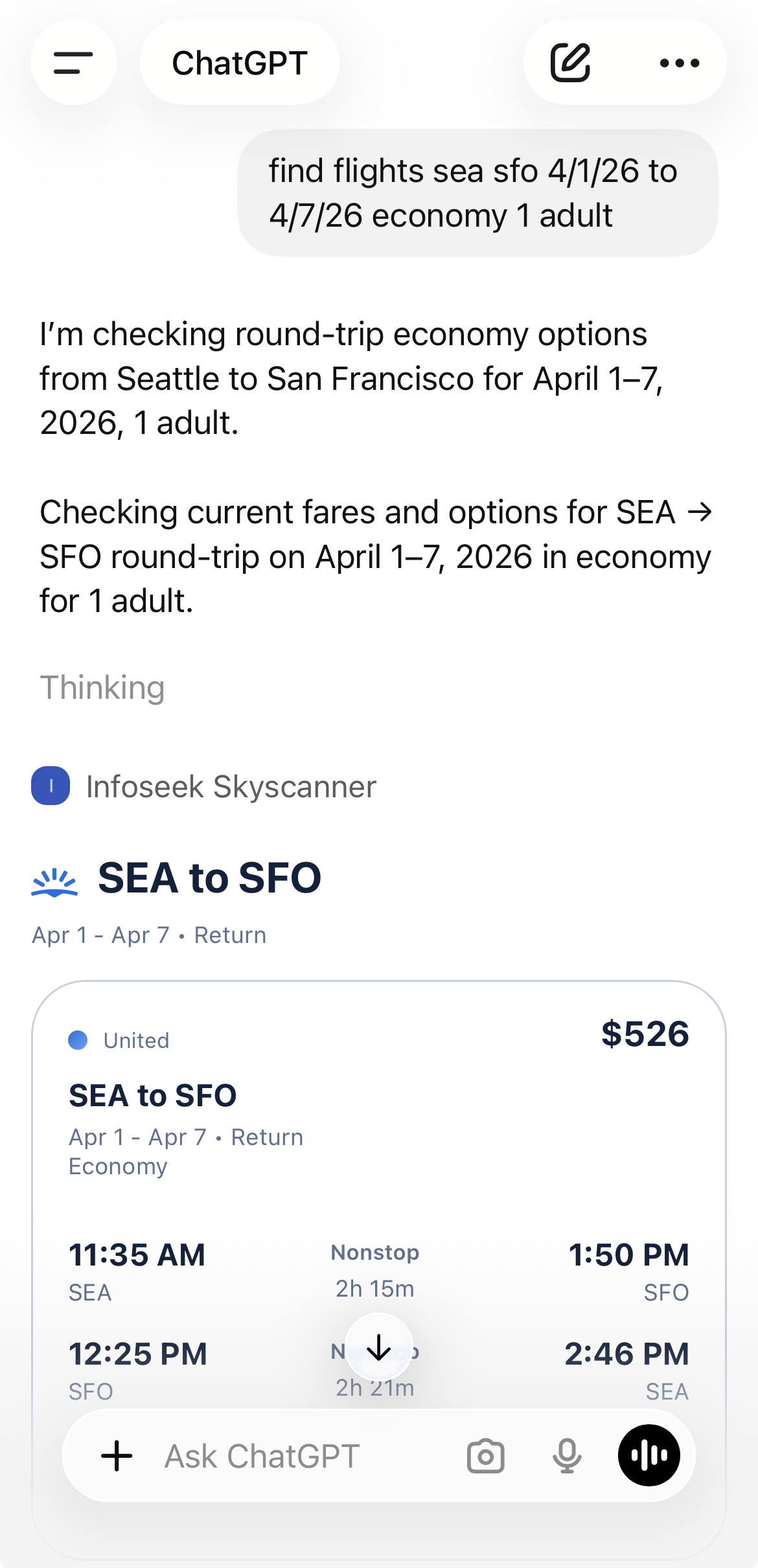
Skyscanner MCP demo showing a one-shot MCP call inside ChatGPT

Tools

The public MCP surface is intentionally simple: one Skyscanner tool takes a structured itinerary and returns both normalized results and card-shaped output for downstream UI rendering.

Tool

search_flights_sky

flight

Use this tool for exact one-way or roundtrip Skyscanner flight searches with explicit airport codes, exact dates, cabin class, and passenger counts.

Required inputs

  • from_airports
  • to_airports
  • departure_date

Useful optional inputs

  • return_date
  • flight_class
  • adults, children
  • prefer_directs

Returns

  • results[]
  • count
  • search
  • cards[]

Response JSON

The useful output is not just raw itinerary rows. The MCP returns a search summary and pre-shaped cards that can be rendered directly into agent UIs and chat surfaces.

cards[]

Best path for UI rendering. Each card already bundles airline, timing, stop, and price details in a user-facing shape.

results[]

Rawer itinerary records that are useful when you need agent-side ranking or custom transformation logic.

count

Quick signal for how many results were returned without iterating the full payload.

search

Echoes the normalized itinerary used to generate the search, which helps with grounding and auditability.

{
  "count": 2,
  "search": {
    "from_airports": ["SEA"],
    "to_airports": ["BCN"],
    "departure_date": "2026-11-11",
    "return_date": "2026-11-17",
    "flight_class": "economy"
  },
  "cards": [
    {
      "price_display": "$666",
      "deep_link": "https://www.skyscanner.com/...",
      "outbound": {
        "airline": "Turkish Airlines",
        "departure_time": "7:00 PM",
        "arrival_time": "7:20 PM",
        "stops_label": "1 stop"
      },
      "return": {
        "departure_time": "10:15 AM",
        "arrival_time": "5:05 PM"
      }
    }
  ],
  "results": [
    {
      "price_display": "$666",
      "carrier": "Turkish Airlines"
    }
  ]
}

Quickstart + Code

The best way to use the MCP is one exact itinerary request per search. Normalize route, dates, cabin, and passenger counts once, then call the tool directly.

One-shot workflow

  1. 1. Convert route airports to explicit IATA codes like SEA and BCN.
  2. 2. Pass the full itinerary, including return_date when the user asked for roundtrip.
  3. 3. Render cards directly or use results for custom ranking.
const flights = await mcp.callTool("search_flights_sky", {
  from_airports: ["SEA"],
  to_airports: ["BCN"],
  departure_date: "2026-11-11",
  return_date: "2026-11-17",
  flight_class: "economy",
  adults: 1,
  prefer_directs: false
});

return {
  count: flights.count,
  topCard: flights.cards[0],
  rawResults: flights.results
};

Access

The public tool contract is currently a direct MCP tool surface. The lambda does not advertise tool-level OAuth in the Skyscanner tool schema.

tune

Structured Inputs

The main constraint is input quality: exact dates and explicit IATA codes are required. Flexible date and location searches are intentionally unsupported.

widgets

Widget-Ready Output

The MCP is designed to feed both agents and UI surfaces, with a card-oriented output path for direct rendering.

Why These Outputs Matter

Roundtrip Integrity

The tool contract is explicit about preserving stated return dates, which helps prevent common itinerary-loss bugs in planner pipelines.

UI-Ready Cards

The cards array is immediately useful for chat widgets and embedded travel result views, without a second formatting pass.

Explicit Search Grounding

The search object gives your app a normalized record of the exact itinerary used, which is useful for follow-ups and reproducibility.

Use Cases

assistant

Flight Shopping Agents

Answer exact-date route requests with Skyscanner results and UI-ready fare cards in one call.

travel

Travel Planning Copilots

Blend live Skyscanner search results into broader itinerary planning, hotel comparison, and trip-budget workflows.

monitoring

Internal Fare Tools

Use one structured MCP call to enrich internal travel workflows with current route pricing and carrier options.