Booking.com icon Travel MCP

Booking.com Flights MCP

Run exact Booking.com flight searches from your AI app with one MCP call for route, dates, cabin class, passenger counts, and direct-flight preference.

  • check_circle One public tool for one-way or roundtrip search
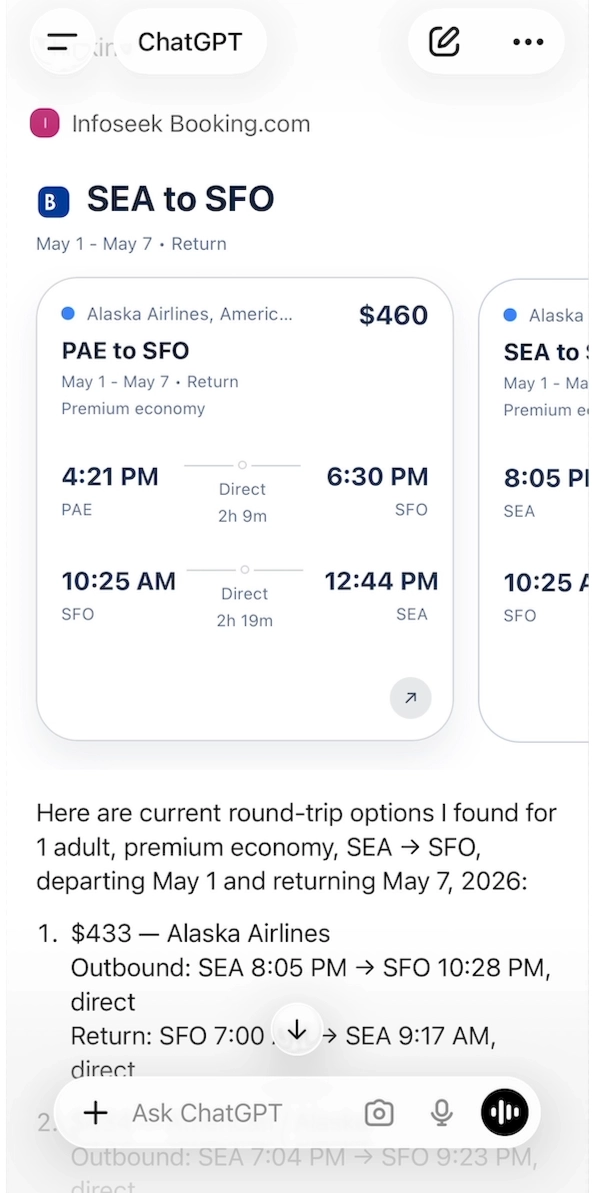
  • check_circle Structured output with cards, search summary, and result rows
  • check_circle Widget-ready response via openai/outputTemplate
Booking.com Flights MCP demo showing the search_flights_booking MCP call and widget output

Tools

The public MCP surface is intentionally simple: one Booking.com tool handles the full itinerary search and returns both raw result rows and UI-shaped cards.

Tool

search_flights_booking

flight

Use this tool for exact Booking.com flight searches with explicit airports and dates. Send one full itinerary per call. For roundtrip searches, include both departure_date and return_date in the same request.

Required inputs

  • from_airports
  • to_airports
  • departure_date

Useful optional inputs

  • return_date
  • flight_class
  • adults, children
  • prefer_directs

Returns

  • results[]
  • count
  • search
  • cards[]

Response JSON

The MCP returns a search summary, a card list for UI rendering, and underlying result rows. That makes it usable both for direct chat widgets and downstream agent ranking.

cards[]

Best path for UI rendering. Each card includes price, route labels, and a Booking.com URL ready for click-through.

results[]

Rawer flight rows that are useful when your agent wants to rerank, summarize, or compare providers.

search

Compact route and date summary for cards, logs, and fallback summaries.

count

Immediate result cardinality without iterating the whole payload.

{
  "count": 5,
  "search": {
    "route_label": "SEA → BCN",
    "date_label": "Nov 11 - Nov 17",
    "search_url": "https://www.booking.com/flights/..."
  },
  "cards": [
    {
      "id": "booking-flight-card-1",
      "price_display": "$666",
      "route_label": "SEA → BCN",
      "booking_url": "https://www.booking.com/flights/..."
    }
  ],
  "results": [
    {
      "price_display": "$666",
      "segments": [],
      "booking_url": "https://www.booking.com/flights/..."
    }
  ]
}


Quickstart + Code

The MCP uses standard JSON-RPC methods. The public surface includes tools/list, tools/call, resources/list, and resources/read. The Booking widget is exposed at ui://widgets/booking-flights.

POST /api/mcp/booking
{
  "jsonrpc": "2.0",
  "id": "1",
  "method": "tools/call",
  "params": {
    "name": "search_flights_booking",
    "arguments": {
      "from_airports": ["JFK"],
      "to_airports": ["LHR"],
      "departure_date": "2026-05-01",
      "return_date": "2026-05-10",
      "flight_class": "business",
      "adults": 1
    }
  }
}

Access + Auth

This MCP exposes a standard MCP transport surface. In practice, teams usually consume it through Infoseek routing or a direct MCP client that speaks JSON-RPC and can call tools/list and tools/call.

The widget contract is built in: the tool advertises openai/outputTemplate and returns card-shaped output that can render directly into chat-based AI interfaces.

Why These Outputs Matter

  • Better comparison: results[] gives your agent raw Booking.com flight rows for provider-side ranking.
  • Faster rendering: cards[] is already shaped for widget UIs and chat surfaces.
  • Persistent links: cards retain the Booking.com search URL for user handoff.

Use Cases

Parallel flight comparison

Run Booking.com alongside Google Flights, Skyscanner, and Skiplagged when your agent needs one provider call per source.

Structured travel copilots

Use exact airport/date queries instead of fuzzy prompts so the model gets a stable flight result payload back.

Widget-first flight UIs

Render Booking.com results directly from the MCP response without building a second transformation layer in your app.

Need this MCP in your stack?